More than just numbers
Our benchmarks got a fresh look, better ways to explore performance, and a few new capabilities for agents. Here are some of our favourite improvements.
tl;dr
Last week, we gave our benchmarks some love.
We revisited the interface, polished up the details, and made it easier to understand what's happening behind the numbers. We've also introduced a few new ways for agents to explore the results, which we're particularly excited about.
Here's a quick rundown of what's new:
- Reports now lead with their findings, not just a chart.
- A refreshed leaderboard and more ways to explore performance over time.
- Floating filters, shareable views, and better link previews.
- A new Data mode for when you just want the numbers.
- Markdown pages, llms.txt, a JSON API, and an MCP server for agents.
You can try everything out at benchmarks.vlt.io, but we wanted to share a few of the details that went into this update.
The details make the difference
We've been running benchmarks for our package manager and registry for a while now. There's quite a bit of data to explore, and as that history grows, we've found ourselves asking more questions of it.
Which tool is consistently faster? Did a release introduce a regression? Is that improvement actually significant, or just noise between runs?
We wanted the interface to make those questions easier to answer.
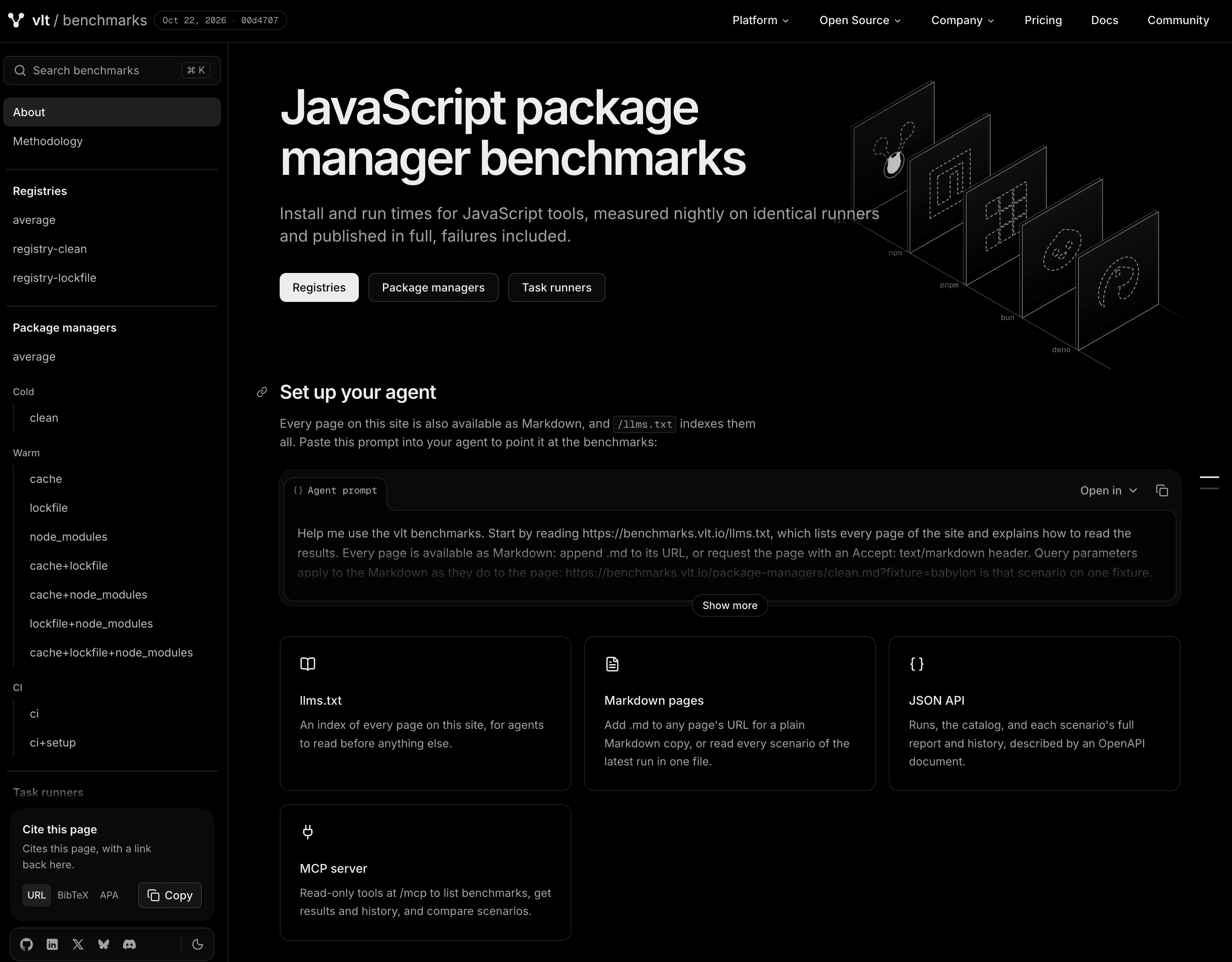
The new about page in the Benchmarks
The results, up front
Previously, opening a report meant looking at a chart and figuring out what it was telling you.
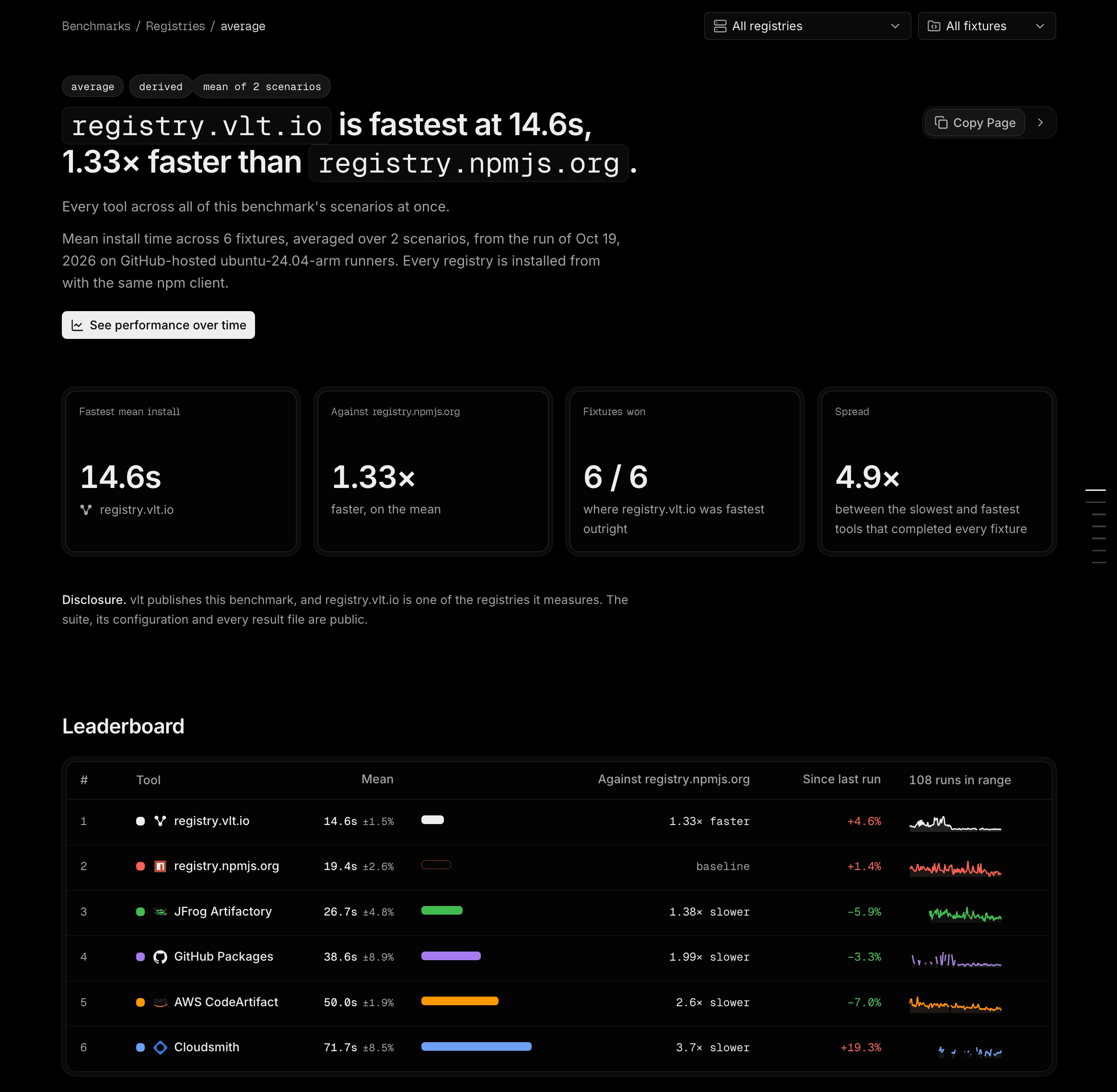
Now, every report starts with a short summary of its findings. You'll see which tool performed best, how it compares to the others, and the conditions under which it was measured.
We also replaced some of the more cryptic scenario names with descriptive tags. Instead of having to remember what cache+lockfile means, you can see at a glance whether an installation used a warm cache, an existing lockfile, or node_modules.
It's a small detail, but useful context when comparing results. A cold install and a warm install can tell very different stories about the same tool.
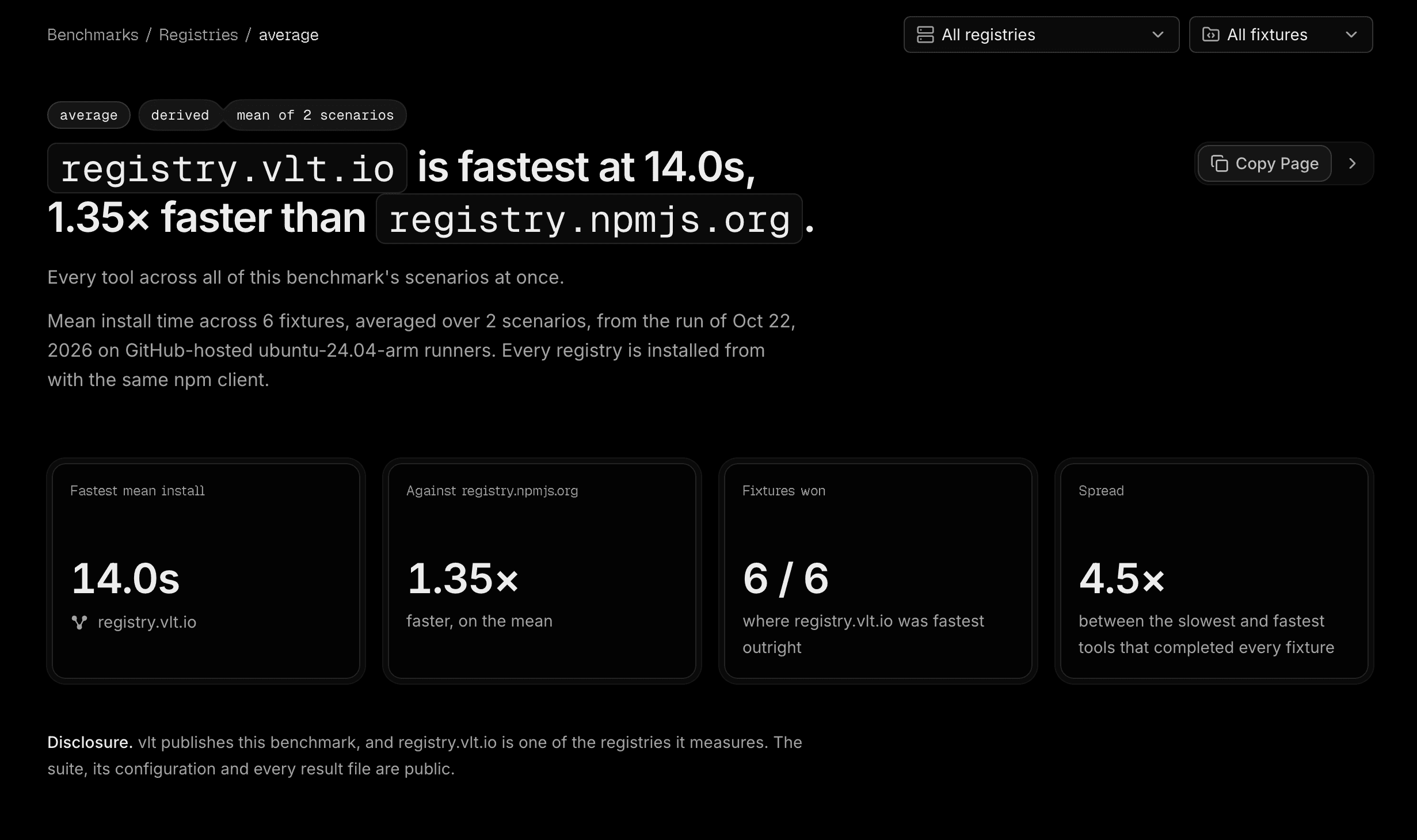
A report summary of a the Registry Benchmarks
A closer look at performance
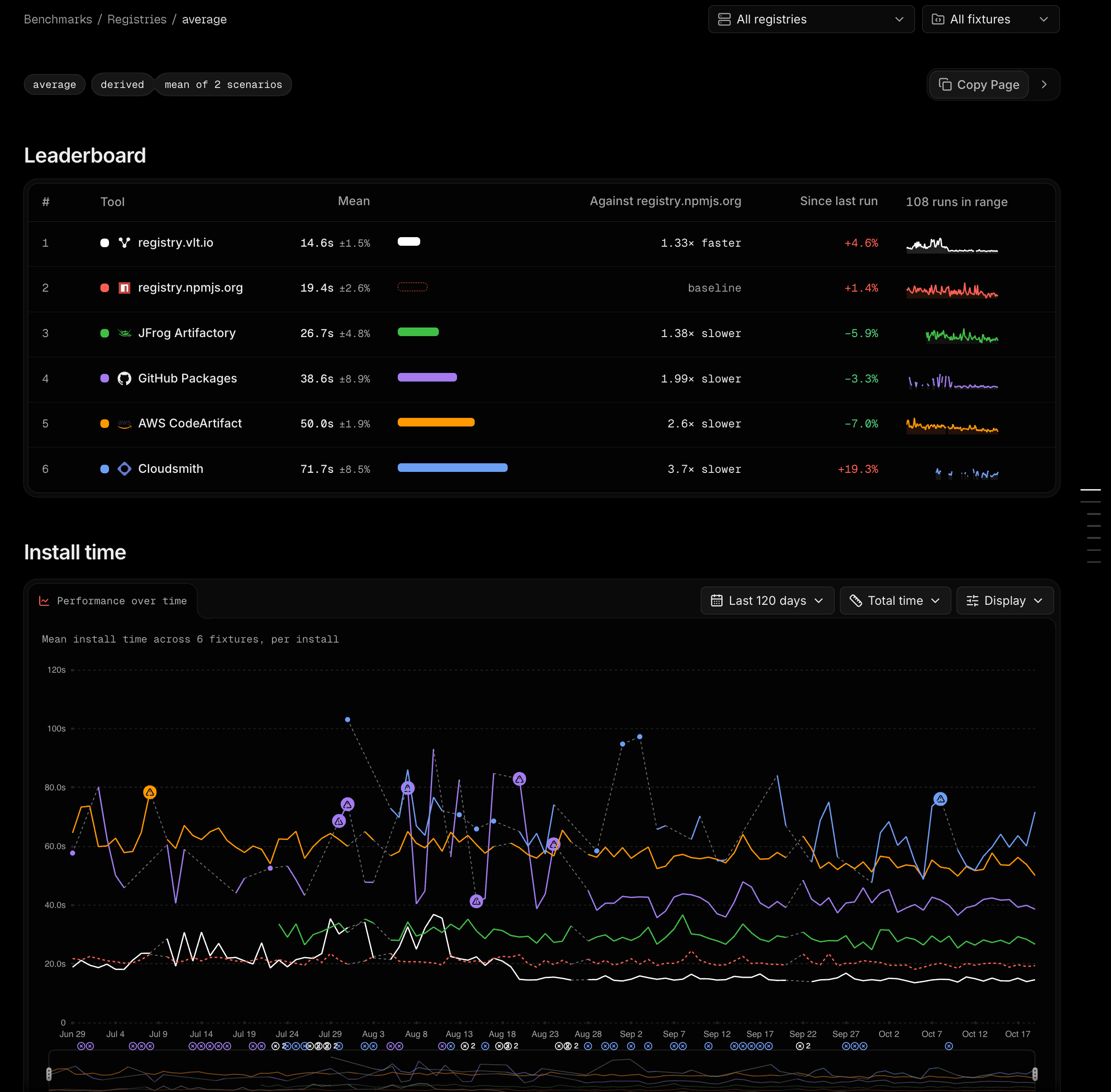
The leaderboard has had a bit of a makeover.
Alongside each tool's average time, you'll now find its variance, comparison against the baseline, change since the previous run, and a small sparkline showing its performance history.

The registry leaderboard
We've also made incomplete runs more obvious. If a tool fails to finish a fixture, it shouldn't quietly compete against tools that completed the entire workload.
Just below the leaderboard is the updated Performance over time chart.
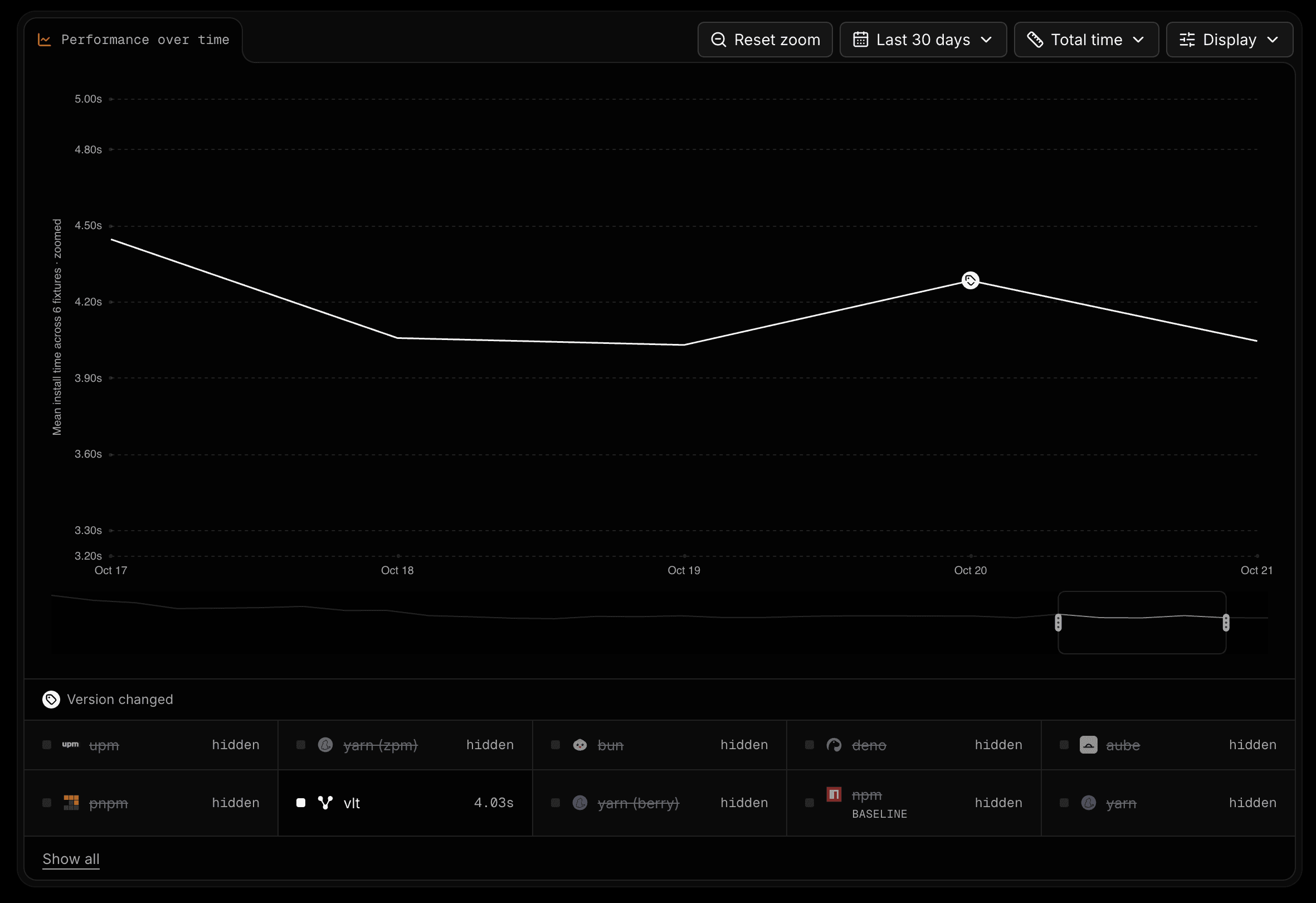
The performance over time chart of Package managers - cold - clean scenario
You can explore up to 120 days of history, zoom into specific periods, and switch between total installation time, relative performance, change over time, and time per installed package.
There's a new Display menu for adjusting the scale, smoothing out fluctuations with a 7-run median, and controlling how missing results are represented.
One detail we particularly like is version markers. When a tool's version changes, the chart marks it. If performance suddenly shifts, you can see which release it coincided with.
That's the sort of thing we find ourselves looking for when investigating regressions, and it's nice to have it right there in the chart.
Less scrolling, more exploring
Some of our reports can get pretty long.
To make navigating them a little easier, we've added floating filters that follow you as you scroll. Breadcrumbs and the tool and fixture selectors move into a compact toolbar, with active filters shown as removable chips.
We've also made reports much easier to share.
Your selected tools, fixtures, date ranges, and chart settings are all reflected in the URL. If you find something interesting, you can copy the link and send someone directly to the same view.
And when you share a chart, its link preview actually shows that chart.
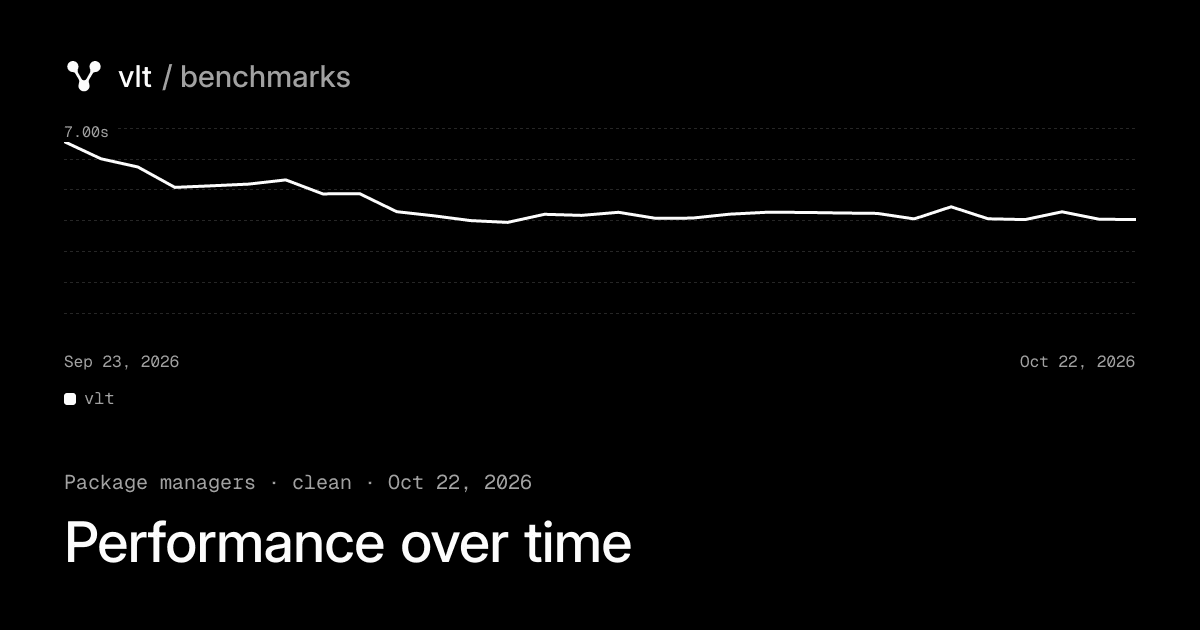
The dynamic OG image of a shared chart Package managers - cold - clean scenario
We've noticed benchmarks have been gaining attention in third party Pull Requests, with runs being evaluated by agentic tooling which often times references raw data. We've added citations in BibTeX and APA formats, direct links to historical runs, and a Copy Page option that gives you the report as Markdown or opens it in Claude, ChatGPT, or Claude Code to make sharing easier.
It's a better experience than sending someone a screenshot and explaining which filters you had selected.
Just the numbers
We like the extra context, but sometimes you don't need it.
There's now a Data mode toggle in the footer that strips away the introductions, explanations, and callouts, leaving a denser layout focused on the charts and tables.
Your preference is saved in the browser, so you can move between reports without having to turn it on again.
data mode enabled
data mode disabled
Beyond the browser
We've spent a lot of time making our benchmarks nicer for humans to use, but developers aren't always the ones doing the investigating. Sometimes they're directing an agent to do it for them. We've made a few changes to help agents find their way around too.
Sometimes it's an agent looking into a regression, comparing historical results, or trying to understand why one tool performs differently under certain conditions.
We don't think those investigations should require an agent to navigate a website designed for humans.
The underlying data is already there. We just needed to make it accessible in ways that suit how agents work.
Every page, as Markdown
Every benchmark report now has a Markdown version.
Append .md to the URL, or request the page with an Accept: text/markdown header, and you'll get the report's findings, leaderboard, and per-fixture results without having to parse the rendered page.
Filters work here too. For example, /package-managers/clean.md?fixture=babylon returns the clean-install report filtered to the Babylon fixture.
We've also added llms.txt, which documents the available reports, how they're structured, and the filters they accept.
For a broader view, llms-full.txt contains every scenario from the latest run in a single file.
Let agents investigate
We wanted to go a little further than making the pages readable.
Our benchmarks now expose a read-only MCP server, with tools for listing benchmarks, retrieving results, exploring history, and comparing scenarios.
There's no authentication required. To connect it to Claude Code:
sh
claude mcp add --transport http vlt-benchmarks https://benchmarks.vlt.io/mcpFrom there, you can ask questions like:
- "How has pnpm's clean install time changed over the last 90 days?"
- "Which registry is fastest for a cold install?"
- "How did performance change between the last two releases?"
The agent can query the published measurements, compare results across runs, and use that information to investigate further.
There's also a JSON API for agents who want to work with the data directly. You'll find its spec at /openapi.json.
We've included a ready-made setup prompt on the About page, too.
What interests us most here isn't just making benchmark data available to agents. It's what happens when that data becomes part of their workflow.
A developer investigating a regression shouldn't have to manually collect a week's worth of measurements before asking an agent to look for patterns. Likewise an agent shouldn't have to jump through hoops and waste tool calls and token costs to get it. An agent working on package manager performance can now consult those measurements directly, just as it would read source code, run tests, or inspect logs.
There's still plenty of room to explore this, but making the results accessible is a good place to start.
Making sense of the numbers
None of these improvements would mean much without reliable measurements behind them.
Every night, we run our package manager and registry benchmarks against the same set of fixtures, from small projects to large monorepos.
We test different installation conditions, from completely cold starts to warm caches with lockfiles and existing node_modules directories.
We've been collecting results since August 2025, giving us a growing history to compare against.
Failed runs are excluded from aggregate figures and marked as DNF (did not finish). We publish both total installation time and time per installed package, since fixture size can make a significant difference when comparing tools.
The raw results are public, and the full setup is documented in our methodology.
These benchmarks have always been useful for understanding how vlt performs against other package managers and registries. They're also one of the ways we evaluate the work we're doing ourselves.
When we make changes to the client, we can follow how installation performance changes across different fixtures. When we're improving the registry, we can compare its performance against the alternatives developers are already using.
And because the benchmarks run nightly, we're not limited to comparing a handful of isolated results.
We can look at performance over time, see where things have improved, and catch regressions that might otherwise go unnoticed.
That's a big part of why we've put this much attention into the benchmarks themselves. The easier they are to explore, the more useful they become in our own development process.
The same goes for making them available to agents. We'd like performance data to be something our tools can work with, not just something we periodically go looking for.
We're building a package manager and registry, and these benchmarks help us understand how well we're doing. Making that feedback easier to access, for us and for the tools we work with, makes it all the more useful.