Activity Logs & Usage
See who did what in your vlt.io account, and what is driving your Storage & Delivery usage.
tl;dr
- Every account now has an Activity log: publishes, deprecations, visibility changes, new tokens and invitations, with who did it, which token they used, and where the request came from.
- Filter by date, member, and category, search across actions, package names and IPs, and export what you're looking at as CSV.
- Billing is now split into Usage, Seats and Invoices tabs. Usage charts your Storage & Delivery against your plan's allowance, and shows which packages and publishes contributed to it.
- Both are available to account owners and admins.
The Activity Log
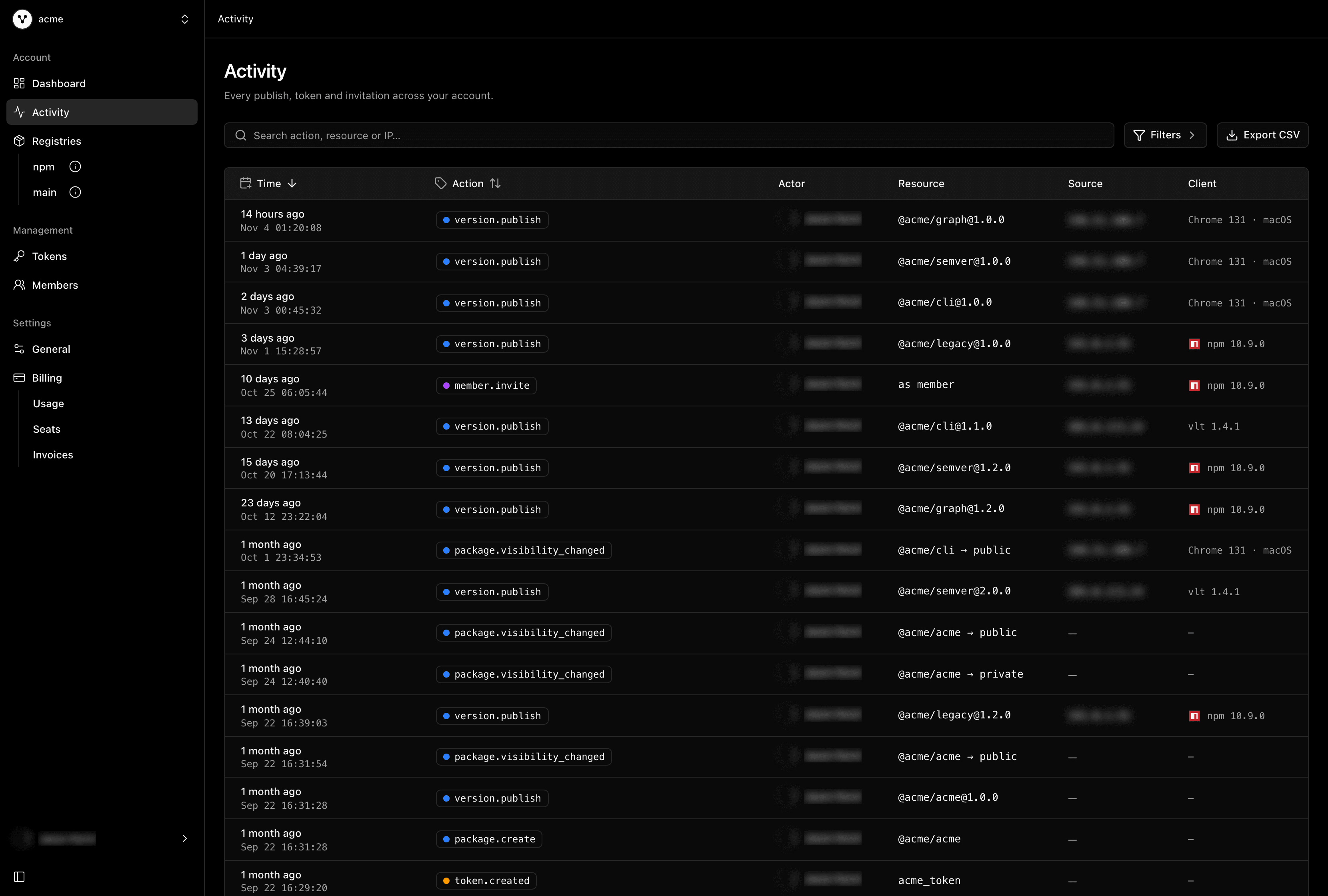
The activity log for the acme account
Head to Activity in the sidebar, or go straight to vlt.io/activity/<account>. Each row is one thing that happened in your account: what the action was, who did it, which resource it touched, when, and where it came from.
For every entry we record:
- The actor: the member who did it, and the token they used, so a publish from CI reads differently from one made at someone's laptop.
- The source: the IP address the request came from.
- The client: whether it was the vlt client, another package manager, or the browser, along with its version and platform.
- The request ID, so a single entry can be traced end to end if you ever need to dig in with us.
Use the filter menu to narrow things down by date, member, or category (packages, tokens, members, and account), or search for a package name, an action like version.publish, or an IP address. Every filter and sort lives in the URL, so the view you're looking at is a link you can share.
When you need the data somewhere else, Export CSV downloads up to 10,000 entries that match your current filters.
Activity Details
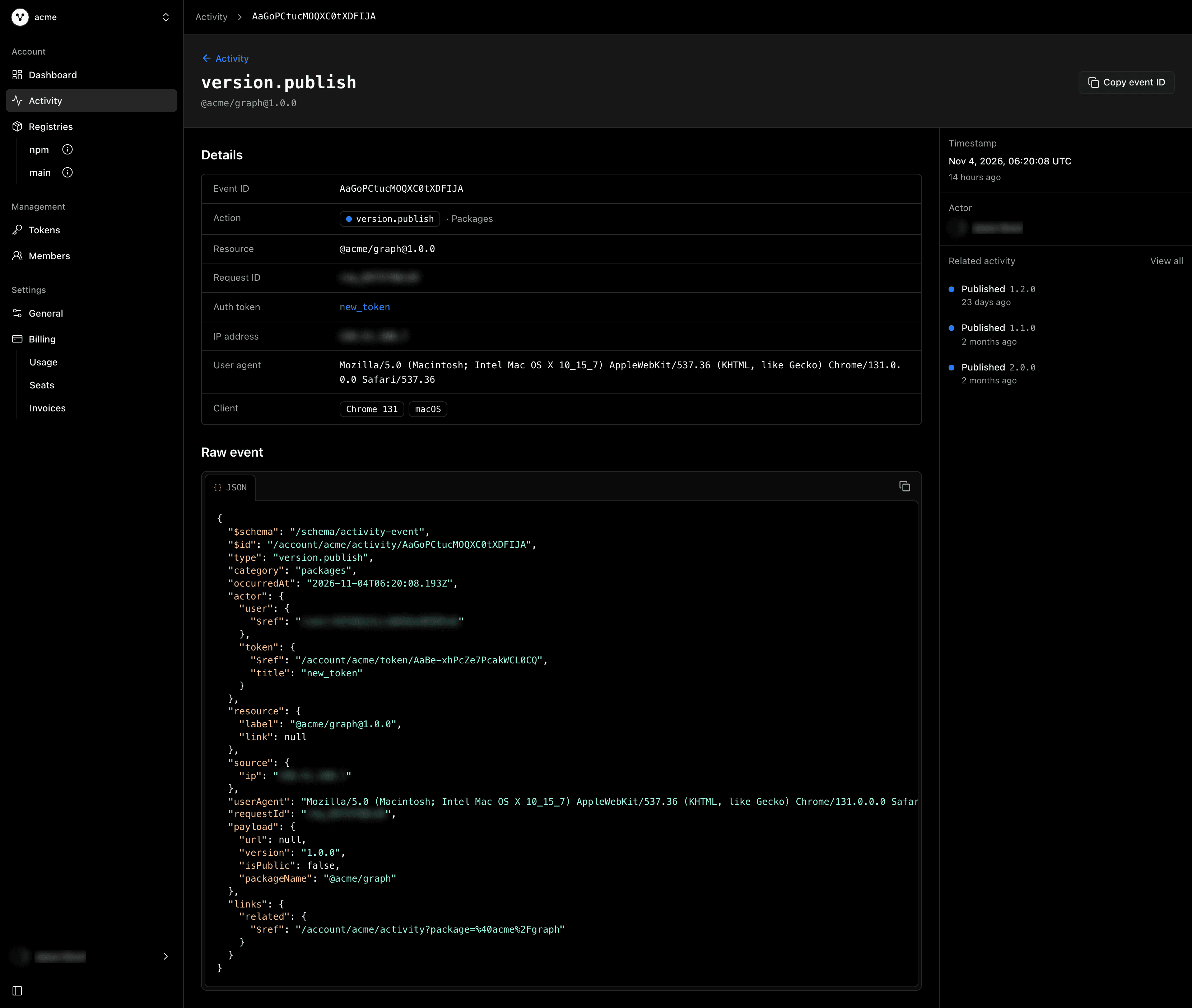
A version.publish event in detail
Click any row to open its detail page. You'll find the full set of fields for that entry, the raw event as JSON for copying into a ticket or a script, and a short list of related activity, like the other releases of the same package, so you can see an action in context without going back to the table.
Usage on the Billing Page
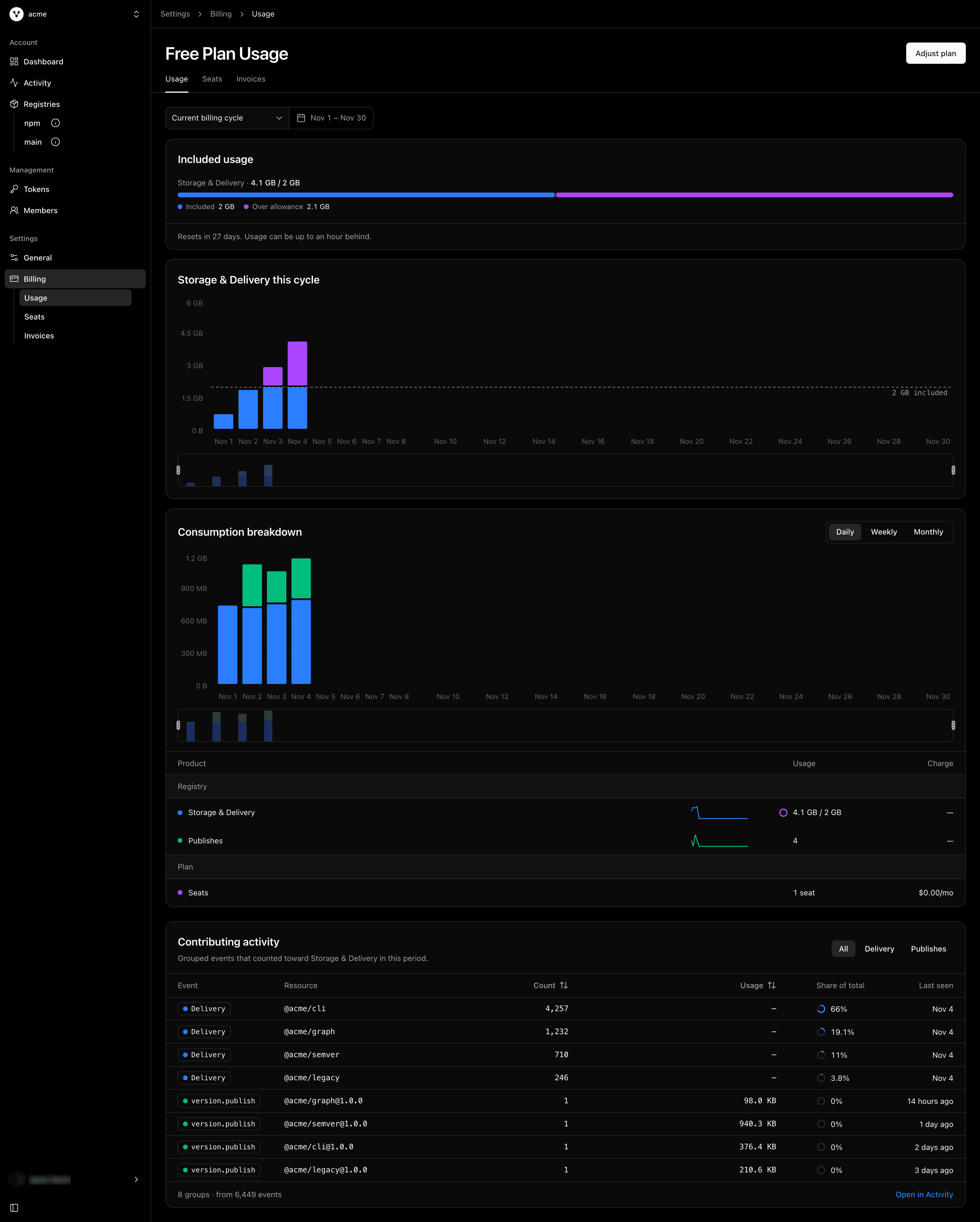
The Usage tab for an account past its included Storage & Delivery
Billing now has three tabs: Usage, Seats and Invoices.
Included usage shows how much of your plan's Storage & Delivery you've used this billing cycle, and how many days until it resets. If you've gone past your allowance, the overage shows up in purple. Right below it, a chart tracks the running total for each day of the cycle against your allowance, so you can see when you crossed the line, not just that you did.
Consumption breakdown charts usage over the current billing cycle or the last 7, 30, or 90 days, by day, week, or month, split into what was delivered to installers and what was uploaded by publishes. Underneath, each product is listed with its trend and its usage for the period, along with the seats on your plan.
Contributing activity & events answers the question that usually comes next: what's driving this? It lists your most downloaded packages and your recent publishes for the period, with each one's share of the listed activity. Publishes link straight to their entry in the Activity log.
Seats lists the members taking a seat on your plan and the invitations still waiting to be accepted, with when each one joined or was invited. Invoices lists your invoices, with a link to view or download each one.
Who Can See It
Activity and usage are visible to account owners and admins. Activity is backed by a new activity:read privilege, so you can also mint a token with read access to your activity log, for example to pull it into your own tooling, without handing out anything else.
What This Means For You
Your registry is where your code becomes something other people install, so it matters who changed what, and when. The Activity log gives you that record without asking you to wire up anything. The Usage tab closes the loop on billing: instead of a single number at the end of the month, you can see the trend, the packages behind it, and the activity that caused it.